Posted by
Lokesh Polimera
Download Vista Drive Icon For Your Windows XP

Posted by
Lokesh Polimera
TeraCopy is a compact program designed to copy and move files at the maximum possible speed, providing the user with a lot of features:
- Copy files faster. TeraCopy uses dynamically adjusted buffers to reduce seek times. Asynchronous copy speeds up file transfer between two physical hard drives.
- Pause and resume file transfers. Pause copy process at any time to free up system resources and continue with a single click.
- Error recovery. In case of copy error, TeraCopy will try several times and in the worse case just skip the file, not terminating the entire transfer.
- Interactive file list. TeraCopy shows failed file transfers and lets you fix the problem and recopy only problem files.
- Shell integration. TeraCopy can completely replace Explorer copy and move functions, allowing you work with files as usual.
- Full Unicode support.
- Windows 7 x64 support.
Posted by
Lokesh Polimera
Posted by
Lokesh Polimera

eMule is one of the biggest and most reliable peer-to-peer file sharing clients around the world. Many developers contribute to the project, so the network gets more and more efficient with every new version. The new eMule 0.50a (7 April 2010) introduces a new algorithm to verify downloaded files. This improves download speed as it reduces the number of corrupt parts. It also works better in Windows 7 and improves the interface making it easier to use.
eMule -- Searches Your Required Song/Software/Movie/PPT etc and Gives You Download links in the Site..
Good Searcher than Google..
Posted by
Lokesh Polimera
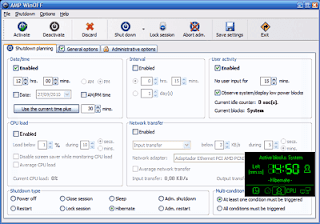
Most of the computer users have had a time when they wanted to shut down their computer automatically without the manual intervention of pressing ALT + F4 and ‘Turn Off’.. or the classic way of clicking on ‘Start’, selecting ‘Turn Off Computer’ and finally clicking on the ‘Turn Off’ button… Now just forget that… Here’s AMP WinOFF for you.This is the best windows shutdown utility I have ever come across. The latest updated version is simply awesome.Here are some of the key points on ‘Why to use this and only this ?’ ;) 1. You can shutdown/restart/hibernate/lock your computer at any designated time.2. It gives you an option to shutdown as per your CPU stats, i.e. if you want to shutdown when your CPU usage goes below say 5%, then you can do it. (It has a option to disable the screensaver while calculating the CPU load.)3. If you want that the system should shut down everyday at a particular time, you have got an option.. Just go to the General Options and enable the ‘Auto – reactive the last programmed shut down’.4. Wanted to know which program was running when you shut down or what was its status ? Fine. You have got what you wanted. It allows to capture screenshot whenever the system is shutting down and that too in JPG or BMP format.5. AMP WinOFF allows you to execute a program just before shutting down.6. Did you want that it should ask you for confirmation before shutting down. OK. Select ‘Ask for confirmation’ in the ‘General Options’ tab.7. You can set an administrative password so that unauthorized persons using your computer cannot change your shutdown time.8. Moreover, as a security feature it has a provision to either ‘Restart the program if it’s aborted’ or ‘Shut down the system as soon as the program is aborted.’9. You can also shut down remote computers using this.10. Finally, if required you can hide the taskbar icon for this program.PS: The help is also awesome. Everything has been explained in a very descriptive way.One more thing it is totally F-R-E-E…
Posted by
<. Lokesh Polimera .>
Posted by
<. Lokesh Polimera .>

You can Execute c , cpp programs with this ..
It also includes packages like graphics , math etc library functions no additional requirements needed !!
Alternate link:
NOTE: AFTER DOWNLOADING GO TO C DRIVE --> TC -->BIN --> FIND TC , IN THE BIN FOLDER...THEN RIGHT CLICK ON IT (TC ICON) , SELECT CREATE SHORTCUTNOW COPY THAT CREATED SHORTCUT ICON AND PASTE IN YOUR DESKTOP..
Posted by
<. Lokesh Polimera .>
It is a pseudo-UNIX environment for Windows. It's tiny but powerful. CygNix has integrated many useful Unix/Linux tools, including bash, mc, awk, wget, lftp, sed, ssh, vim, and much more.
It is ideal for system administrators who need to logon and admin remote Unix machines. Unix users who sometimes have to do some routine works under Windows will also find it useful. And it's also a good choice for beginners to learn Unix.
--> u can do linux , unix , cd , os lab pgms with this software .
--> note: some commands might not work
Posted by
<. Lokesh Polimera .>
Add life to your desktop wallpaper! Watery Desktop 3D will animate your wallpaper with water effects, such as waves and rain. It will also work as a screen saver which floods your screen, you will see how everything on your desktop will sink into water..


Posted by
<. Lokesh Polimera .>
How many folders do you have on your computer? Scores of them? Hundreds? Thousands? Are all of them are alike: yellow folder, yellow folder, yellow folder, yellow folder... It's so easy to be confused with such a routine!!
Folder Marker is your small assistant, an ardent fighter for your convenience and comfort in any kind of computer work. Use Folder Marker to mark your folders.

Posted by
<. Lokesh Polimera .>
Posted by
<. Lokesh Polimera .>
TeamViewer_5.0.7687.rar (2.5 MB)
TeamViewer connects to any PC or server around the world within a few seconds. You can remote control your friend's PC , right from your house , as if you were sitting in front of it.
Posted by
<. Lokesh Polimera .>
Posted by
<. Lokesh Polimera .>
S imple mark start and end , finish!!
Posted by
<. Lokesh Polimera .>
Yahoo messenger 10
Yahoo messenger 9
Posted by
<. Lokesh Polimera .>
Posted by
<. Lokesh Polimera .>
Folder security personal with KEY
To hide , lock your files.
Foxit readerFor quick and fast opening pdfs
Internet download manager with keygen
For fast downloading..(keygen is not a virus , dont delete it)
Windows XP sp-2 genuine problem solution
In the notepad provided , copy that key and apply it to the keyfinder (second tab change key)
Autorun.inf remover..


